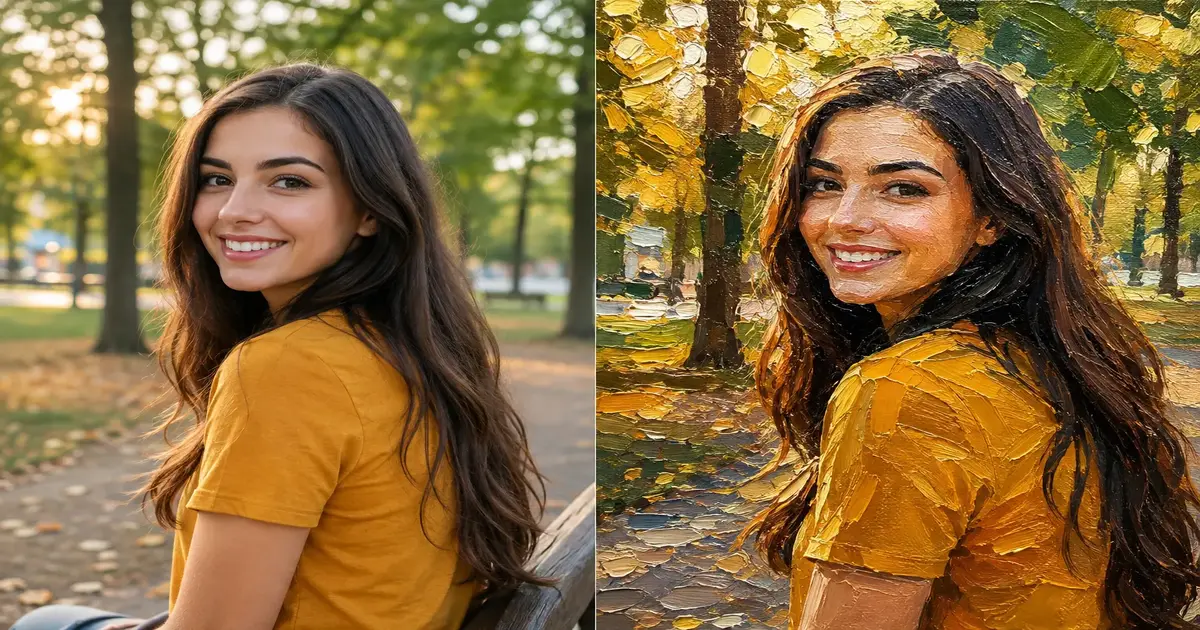
There's a photo on your phone right now that deserves better than sitting in a camera roll. Maybe it's a portrait of your kid mid-laugh, a sunset you almost didn't stop the car for, or a coffee shop shot that just feels like a memory worth framing. An oil paint image converter is the fastest way to turn that ordinary photo into something that looks like it belongs on a canvas — thick brushstrokes, rich color blending, and all — without ever picking up a paintbrush.
A few years ago, getting that look meant hours in Photoshop with filter stacks and a lot of trial and error, or paying an actual painter. Now it takes about ten seconds and a browser tab. Let's get into what these tools actually do, how to get the best results, and where they fit if you're a hobbyist, a small business owner, or just someone who wants a better wallpaper.
What Is an Oil Paint Image Converter (and Why Everyone's Using One)
An oil paint image converter is a tool that analyzes a digital photo and repaints it using algorithms that mimic real oil painting techniques — visible brush texture, blended color transitions, and the slightly imperfect, hand-made feel that separates a painting from a photograph. Instead of just slapping a filter over your image, a good converter actually rebuilds the picture stroke by stroke, the same way a painter would build up layers of pigment on canvas.
From Renaissance Brushstrokes to One Click
Oil painting as a technique goes back centuries, prized for the way it lets an artist layer color, catch light, and add physical texture that a flat photograph simply can't. What's changed isn't the appeal of that look — it's the barrier to getting it. Anyone with a photo and a browser can now apply that same visual language in seconds. That's a big part of why this style of conversion has quietly become one of the most requested effects in photo editing right now, from social media creators to people just decorating their homes.
How an Oil Paint Image Converter Actually Works
Under the hood, most tools follow a similar process. The image is broken down into regions of similar color and tone, then those regions are redrawn using simulated brush strokes that follow the natural contours of the subject — the curve of a cheekbone, the direction light falls across a jacket, the texture of tree bark. The result is an image that keeps the recognizable shape of your original photo but reads visually like paint on canvas.
The Algorithm Behind the Brushstroke
Good converters don't apply strokes randomly. They pay attention to edges and contrast so that fine details — eyes, lips, the outline of a building — stay sharp enough to recognize, while flatter areas like skies, walls, and backgrounds get looser, broader strokes. That contrast between tight detail and loose texture is exactly what makes a real oil painting feel alive, and it's the difference between a tool that looks convincing and one that just smears your photo.
Color Blending and Texture Mapping
The second piece is color. Oil paint physically blends on canvas — a red and a yellow next to each other don't stay perfectly separate, they bleed slightly at the edges. A well-built converter simulates that bleed, softening harsh color boundaries so nothing looks like a digital filter dropped on top of a photo. Some tools go further and add a subtle canvas texture underneath the whole image, which sells the illusion even more.
Who Should Use an Oil Paint Filter
You don't need to be an artist, or even particularly "into art," to get value out of this. A few groups get the most mileage out of it in practice.
Content Creators and Social Media
An oil-painted version of a regular photo stands out instantly in a feed full of the same filtered, over-sharpened images. It's become a go-to move for creators who want a scroll-stopping thumbnail or a distinctive aesthetic for a series of posts without hiring a designer.
Small Businesses and Etsy Sellers
If you sell custom art prints, canvas wraps, or personalized gifts, an oil paint image converter is basically a product-generation shortcut. Customers upload a family photo or a pet picture, you run it through the tool, and you've got a mockup — or a finished product — that looks like commissioned artwork.
Digital Artists Looking for a Starting Point
Plenty of illustrators use a converted image as an underpainting or reference layer, then paint over the top in their own style. It saves the early, tedious stage of blocking in color and shape by hand.
Step-by-Step: Turning Your Photo into an Oil Painting
The actual process is short, but a little care at each step makes a noticeably better result.
Step 1 — Choose the Right Photo
Photos with clear subjects, decent lighting, and moderate detail convert best. A portrait with soft, even light will hold up far better than a dark, grainy night shot, because the algorithm needs contrast and color information to work with.
Step 2 — Upload and Adjust Settings
Once you upload your image to a tool like our oil paint image converter, you'll usually get a couple of controls worth paying attention to.
Brush Size and Texture Intensity
Larger brush strokes give a bolder, more abstract painterly feel — great for landscapes or moody portraits. Smaller strokes preserve more detail, which works better for faces or anything where recognizability matters, like a gift print of a specific person.
Color Saturation
Oil paintings tend to read richer than photographs. Nudging saturation up slightly (without overdoing it) usually makes the final image feel more like a real painting and less like a photo with texture on top.
Step 3 — Download and Share
Once you're happy with the preview, download the full-resolution version. If you're planning to print it — on canvas, a mug, or a poster — export at the highest resolution the tool allows, since painterly texture can look soft if the file is stretched beyond its native size.
Tips for the Best Oil Painting Effect
A few small habits separate a "nice filter" result from something that genuinely looks hand-painted.
Lighting Matters More Than You'd Think
Photos with a single clear light source — window light, golden hour, a studio lamp — convert beautifully because the algorithm can build convincing shadow and highlight strokes. Flat, evenly lit photos (like a lot of phone snapshots taken indoors) tend to come out looking a bit muddy by comparison.
Simplify Busy Backgrounds
If your original photo has a cluttered background, the converter will happily paint every last distracting detail into the final piece. Cropping in tighter on your subject before converting almost always produces a cleaner, more gallery-worthy result.
Quick checklist before you convert
Good lighting, a clear subject, minimal clutter in the background, and the highest resolution photo you have on hand — that's really all it takes to get a result you'll actually want to print or post.
Oil Paint Converter vs Other Art Filters
It's worth knowing when oil paint is the right effect versus something else in your toolkit.
Oil Paint vs Pencil Sketch
Oil paint conversion is about color, texture, and warmth — it works best on photos where color and mood carry the image. If you're after a black-and-white, hand-drawn look instead, a pencil sketch converter is the better fit, especially for portraits meant to feel more minimal or nostalgic.
Common Mistakes to Avoid
The most common misstep is uploading a low-resolution image and expecting a crisp, printable result — texture-heavy effects like oil painting tend to expose low-quality source photos rather than hide them. The second is cranking every setting to maximum; more brush texture and more saturation isn't automatically better, and it can push a portrait into looking distorted rather than painterly. Before you upload, it also helps to check your file size — if you're working with a huge photo straight off a modern phone, running it through an image compressor first can speed up processing without any real loss in quality.
Final Thoughts
An oil paint image converter isn't going to replace an actual painter, and it's not trying to. What it does is take something you already have — a photo — and give it a second life as something that feels more intentional, more personal, and a lot more interesting to look at than the original. Whether you're making a gift, dressing up your social feed, or just curious what your dog would look like as a Renaissance subject, it's one of those tools that's genuinely more fun to try than it sounds on paper. Upload a photo, tweak the brush settings, and see what comes out — you might end up with something you'd actually hang on a wall.